From SuperNote to Obsidian using AWS Textract
I take a lot of handwritten notes on my Supernote device. The problem? They stay locked on the device as .note files — proprietary, unsearchable, and completely disconnected from my Obsidian knowledge base. I wanted a pipeline that would automatically convert my handwritten notes into clean, structured markdown and drop them into Obsidian without me lifting a finger.
The result: an AWS pipeline that takes a .note file, converts it to PDF, runs it through Textract OCR, and passes the text to Claude to structure it into Obsidian markdown. The AWS side is fully event-driven — the two manual steps are running sync-notes.sh to push files up to S3 and sync-markdown.sh to pull the finished markdown down to the vault. Here’s how I built it.
Architecture Overview Link to heading
The pipeline has two halves: an on-premises stack that gets the files to AWS, and an AWS pipeline that processes them.
Supernote device
    ↓ WebDAV (NetVirtualDisk / Server Link)
Nextcloud (WebDAV)   ← Tailscale Funnel exposes this publicly (HTTPS)
    ↓ rclone copy (manual)
AWS S3 (raw bucket)
    ↓ EventBridge (Object Created, *.note)
Step Functions state machine
    ├── Convert  (supernotelib: .note → PDF)
    ├── Textract (async OCR → raw text)
    └── Deliver  (Claude API → Obsidian markdown → S3 processed bucket)
         ↓
sync-markdown.sh (rclone → local Obsidian vault, manual)
The Supernote pushes .note files to Nextcloud over WebDAV. Running sync-notes.sh manually triggers rclone copy to push new files from Nextcloud up to AWS S3. Tailscale Funnel provides the public HTTPS endpoint for Nextcloud — no port forwarding required, and Tailscale doesn’t need to be installed on the Supernote device. From there, EventBridge takes over and kicks off the Step Functions state machine. Once processing completes, running sync-markdown.sh pulls the finished markdown files down to the local Obsidian vault.
On-Premises Stack Link to heading
Nextcloud Link to heading
Nextcloud runs locally and serves as the WebDAV target for the Supernote device. The Supernote’s Server Link feature supports WebDAV natively, so it syncs .note files to Nextcloud automatically.
Tailscale Funnel exposes the Nextcloud WebDAV endpoint over a public HTTPS URL. This is how the Supernote reaches Nextcloud without any port forwarding — Tailscale handles the TLS termination and tunneling entirely on the home server side, so nothing needs to be installed on the Supernote.
sync-notes.sh Link to heading
Running sync-notes.sh manually copies new .note files from the Nextcloud WebDAV remote to the raw S3 bucket:
rclone copy nextcloud:Notes/ "aws:supernote-pipeline-raw-${ACCOUNT_ID}" \
  --include "**/*.note"
rclone copy only transfers files that don’t already exist at the destination, so it’s safe to run repeatedly without re-uploading everything. Making this event-driven is a future improvement — for now, running the script manually before a sync session is a simple and stateless solution.
AWS Pipeline Link to heading
All AWS infrastructure is managed with Terraform (Terraform-compatible). The pipeline uses four Lambda functions packaged as Docker images in ECR, orchestrated by a Step Functions state machine.
S3 Buckets Link to heading
Two S3 buckets with versioning enabled:
- Raw bucket — receives
.notefiles from the consumer - Processed bucket — receives finished
.mdfiles from the Deliver Lambda
Versioning means re-uploading the same note (after corrections) creates a new version and re-triggers the full pipeline automatically.
module "s3_raw" {
  source = "terraform-aws-modules/s3-bucket/aws"
  bucket = "supernote-pipeline-raw-${data.aws_caller_identity.current.account_id}"
  versioning = { enabled = true }
}

resource "aws_s3_bucket_notification" "raw" {
  bucket      = module.s3_raw.s3_bucket_id
  eventbridge = true
}
Note the aws_s3_bucket_notification resource — S3 EventBridge notifications must be explicitly enabled on the bucket, otherwise EventBridge never sees the events.
EventBridge Link to heading
An EventBridge rule fires on every .note file created in the raw bucket and starts a new Step Functions execution, passing the full S3 event as input.
resource "aws_cloudwatch_event_rule" "note_upload" {
  event_pattern = jsonencode({
    source      = ["aws.s3"]
    detail-type = ["Object Created"]
    detail = {
      bucket = { name = [module.s3_raw.s3_bucket_id] }
      object = { key = [{ suffix = "note" }] }
    }
  })
}
Step Functions State Machine Link to heading
The state machine has three states plus a DLQ catch. It is STANDARD type (not EXPRESS) because Textract uses the waitForTaskToken pattern, which requires STANDARD.
Convert → Textract (waitForTaskToken) → Deliver
              ↓ (any failure after retries)
           SendToDLQ → CloudWatch alarm → SNS email
Each state retries three times with exponential backoff before catching to the DLQ. A single DLQ on the state machine (rather than per-Lambda) is sufficient because Step Functions execution history already identifies exactly which state failed.
Convert Lambda — .note → PDF Link to heading
The first Lambda downloads the .note file from S3 and converts it to PDF using supernotelib, then uploads the PDF back to the raw bucket for Textract to consume.
notebook = sn.load_notebook(note_path)
converter = PdfConverter(notebook)
pdf_bytes = converter.convert(-1)  # -1 = all pages; returns bytes
with open(pdf_path, "wb") as f:
    f.write(pdf_bytes)
Two non-obvious gotchas here:
PdfConverter.convert takes a page number, not a path. The method signature is convert(self, page_number, ...) and returns bytes. Passing -1 converts all pages. It does not write to a file — you write the returned bytes yourself.
Lambda does not support ProcessPoolExecutor. supernotelib uses it internally for parallel page rendering, but Lambda’s environment doesn’t allow POSIX semaphores. The fix is to patch the name in the module’s namespace before conversion runs:
import concurrent.futures
import supernotelib.converter

# Lambda can't create POSIX semaphores — redirect to threads.
supernotelib.converter.ProcessPoolExecutor = concurrent.futures.ThreadPoolExecutor
The Dockerfile also needs build tools installed before pip install, since supernotelib depends on pycairo which builds from source:
FROM public.ecr.aws/lambda/python:3.12

RUN dnf install -y gcc cairo-devel pkg-config && dnf clean all

COPY requirements.txt .
RUN pip install -r requirements.txt --no-cache-dir

COPY handler.py .
CMD ["handler.handler"]
Textract Lambda — OCR Link to heading
The Textract Lambda receives the PDF location and a Step Functions task token. It starts an asynchronous Textract job, polls every 5 seconds for completion, then calls SendTaskSuccess with the task token to resume the state machine.
Textract returns blocks in pagination order, which is not guaranteed to match document order across pages. Before joining the text, all LINE blocks are sorted by (Page, BoundingBox.Top):
lines = sorted(
    [b for b in blocks if b["BlockType"] == "LINE"],
    key=lambda b: (b["Page"], b["Geometry"]["BoundingBox"]["Top"])
)
text = "\n".join(b["Text"] for b in lines)
PARTIAL_SUCCESS responses (when Textract can’t process every page) are treated as success — whatever text was extracted is passed downstream with a "partial": true flag, so Claude can still structure the available content.
Deliver Lambda — Claude API → Markdown Link to heading
The final Lambda takes the raw OCR text, calls Claude to structure it into Obsidian markdown, and writes the result to the processed S3 bucket.
def handler(event, context):
    textract_text = event["textract_output"]["text"]
    source_key = event["detail"]["object"]["key"]

    api_key = sm_client.get_secret_value(
        SecretId="supernote/claude-api-key"
    )["SecretString"]
    claude = Anthropic(api_key=api_key)

    response = claude.messages.create(
        model="claude-sonnet-4-6",
        max_tokens=4096,
        messages=[{"role": "user", "content": _PROMPT.format(text=textract_text)}],
    )
    markdown = response.content[0].text

    dest_key = source_key.rsplit(".", 1)[0] + ".md"
    s3.put_object(Bucket=PROCESSED_BUCKET, Key=dest_key, Body=markdown.encode("utf-8"))
The Secrets Manager fetch happens inside the handler (not at module load time). This means key rotations take effect on the next invocation without requiring a redeployment or a forced cold start.
The prompt instructs Claude to produce clean Obsidian markdown: ## for top-level sections, bullet points for lists, - [ ] checkboxes for action items, and **bold** for key terms — with no document title and no preamble.
Deployment Link to heading
ECR lives in its own Terraform root (lib/aws/ecr/) so it can be applied independently without -target hacks. The deploy sequence is:
lib/aws/ecr/   →  push-images.sh  →  lib/aws/
(create repos)    (build + push)      (all other infra)
./scripts/deploy.sh
After the first deploy, set the Claude API key:
aws secretsmanager put-secret-value \
  --secret-id supernote/claude-api-key \
  --secret-string "sk-ant-..."
Syncing to Obsidian Link to heading
Once processed markdown files land in S3, running sync-markdown.sh manually pulls them down to the Obsidian vault:
while IFS= read -r key; do
  filename=$(basename "$key")
  rclone copyto "aws:${AWS_BUCKET}/${key}" "${LOCAL_DIR}/${filename}"
done < <(rclone lsf "aws:${AWS_BUCKET}" --include "**/*.md" --files-only -R)
A plain rclone copy would recreate the S3 key’s directory structure inside the vault. The loop uses rclone lsf -R --files-only to list all .md keys recursively, then rclone copyto to copy each one flat by basename — so every note lands directly in _QuickNotes/ regardless of how it was stored in S3.
Results Link to heading
Here’s a sample of what the OCR + Claude structuring produced from a handwritten note about AWS AppConfig:
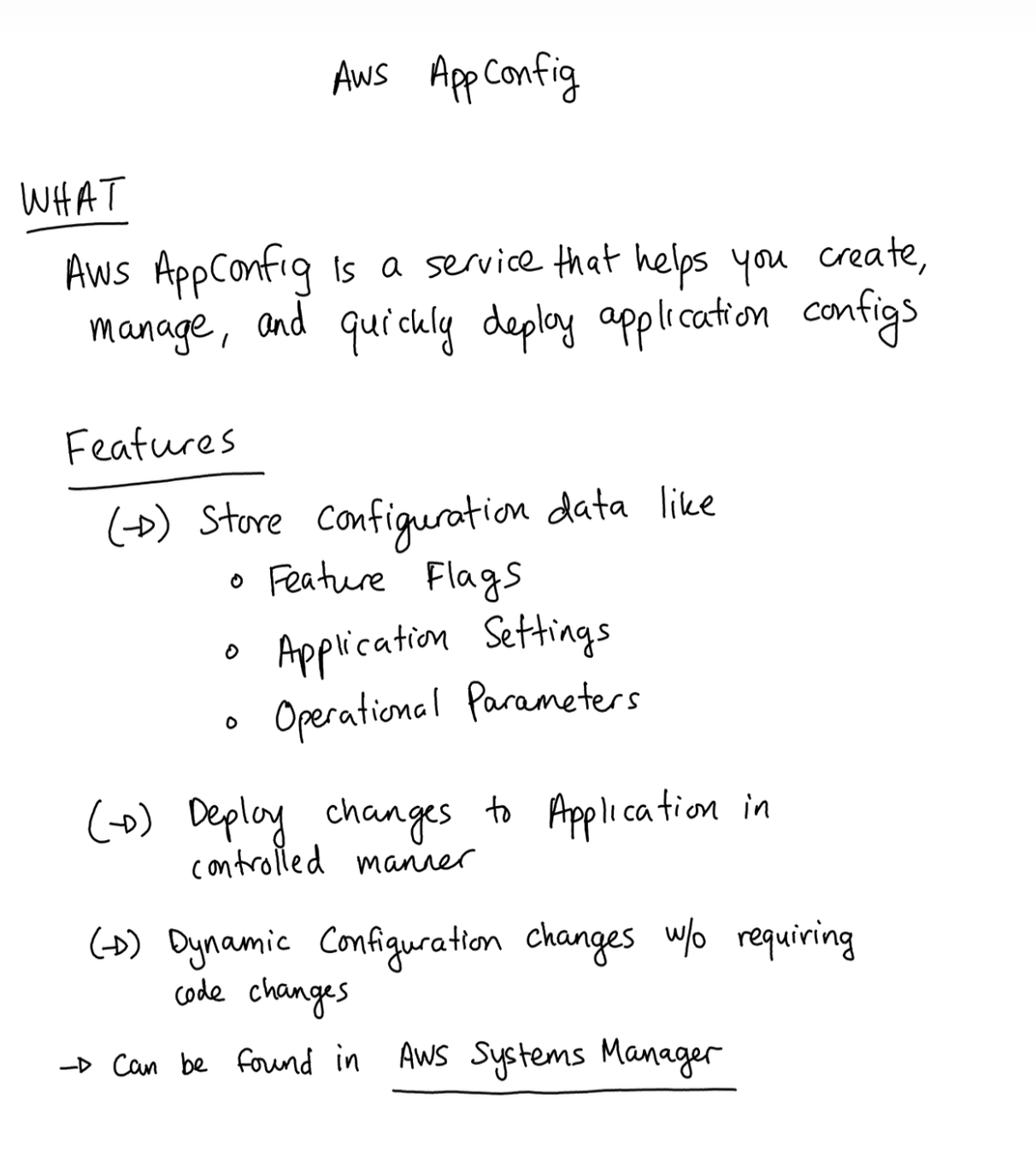
## What is AWS AppConfig?

AWS AppConfig is a service that helps you **create, manage, and quickly deploy application configurations**.

## Features

- Store configuration data like **Feature Flags**, Application Settings, and Operational Parameters
- Deploy changes to applications in a **controlled manner**
- **Dynamic configuration changes** without requiring code changes
- Can be found in AWS Systems Manager

## Key Components

### Application
- A container for configuration profiles and environments

### Configuration Profiles
- Contains actual configuration data
- Supports YAML, JSON, text, S3 objects, Systems Manager Documents, or Parameter Store parameters

### Environment
- Defines where configurations are deployed

## Use Cases

1. **Feature Flag Management** for gradual roll-outs
2. **Dynamic configuration** that can change at runtime without deployments
3. **A/B Testing**
4. Environment-specific configurations (Beta or Prod)
5. Emergency feature toggles

## AppConfig and GenAI

- Control which model to use for Lambda functions
- Gradually roll out to new models
- A/B test different models
Not bad for handwritten notes run through OCR.
Cost Link to heading
At personal-use scale this pipeline is essentially free — my monthly spend rounds to $0.00 in Cost Explorer. For reference, here’s the theoretical cost per note:
| Service | Cost |
|---|---|
| Textract (async API) | ~$0.0015 per page |
| Step Functions (Standard) | ~$0.00025 per execution |
| Lambda | negligible |
| S3 / Secrets Manager | negligible |
A typical 2–3 page note costs roughly $0.003–$0.005 to process. Even at 100 notes a month you’re looking at well under $1.
Conclusion Link to heading
The AWS side of the pipeline is fully event-driven — once a .note file lands in S3, a structured markdown file is ready in roughly 2 minutes (depending on the size and number of pages). The two manual steps are running sync-notes.sh to push files up and sync-markdown.sh to pull them down; automating those with a cron job or filesystem watcher is a natural next step. The main challenges were the supernotelib API quirks, Lambda’s multiprocessing restrictions, and getting the Terraform bootstrap order right without resorting to -target.
The full source is available on my GitLab repository.